Intangible Interaction - Professor Yeseul Song
Proximity Sensor Research: AK9753 Human Presence Sensor
Researched with Jane Lee
and Nujum Islam
and William Yao
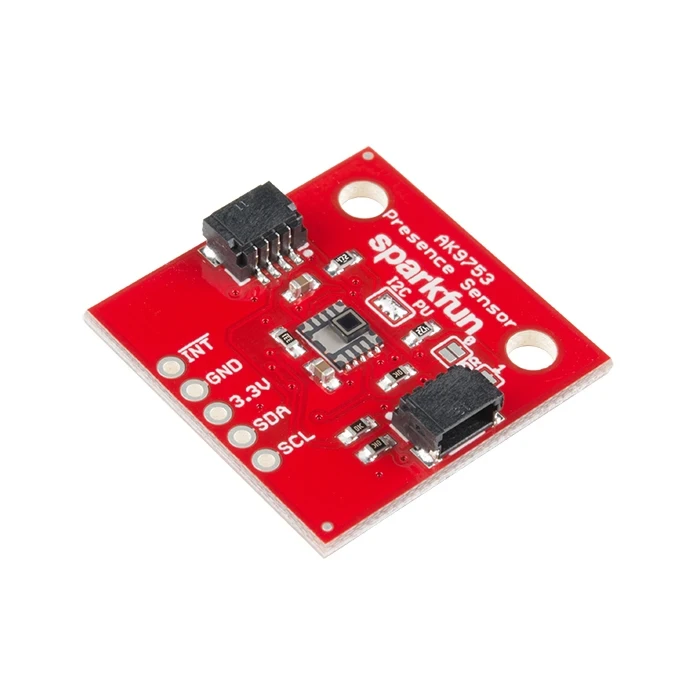
Board Basics
| Pin | Function | Direction |
|---|---|---|
| GND | Ground | In |
| 3.3V | Power | In |
| SDA | Data | In |
| SCL | Clock | In |
| INT | Interrupt, goes high when data is ready. After data is read, the pin pulls low | Out |
https://www.sparkfun.com/sparkfun-human-presence-sensor-breakout-ak9753-qwiic.html
As we learn from the first sentence of the description "This is not your normal PIR! The SparkFun AK9753 Human Presence Sensor Breakout is a Qwiic enabled, 4-channel Nondispersive Infrared Sensor (NDIR)"
But what does that even mean?
PIR
A PIR sensor, or Passive Infrared sensor, detects motion by measuring infrared light radiating from objects in its field of view. Infrared light is emitted by all objects based on their temperature. Most of the time, this sensor is used in security alarms or automatic lights. All objects above absolute 0 emit invisible infrared light and a PIR sensor detects a change in the infrared in its field of view.
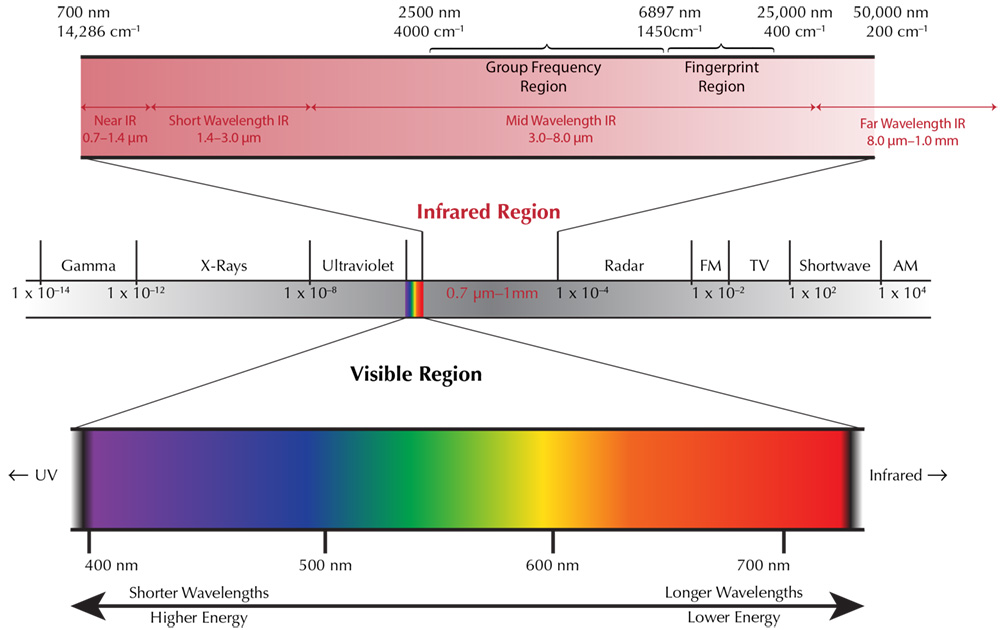
Infrared vs Visible Light Spectrum
NDIR
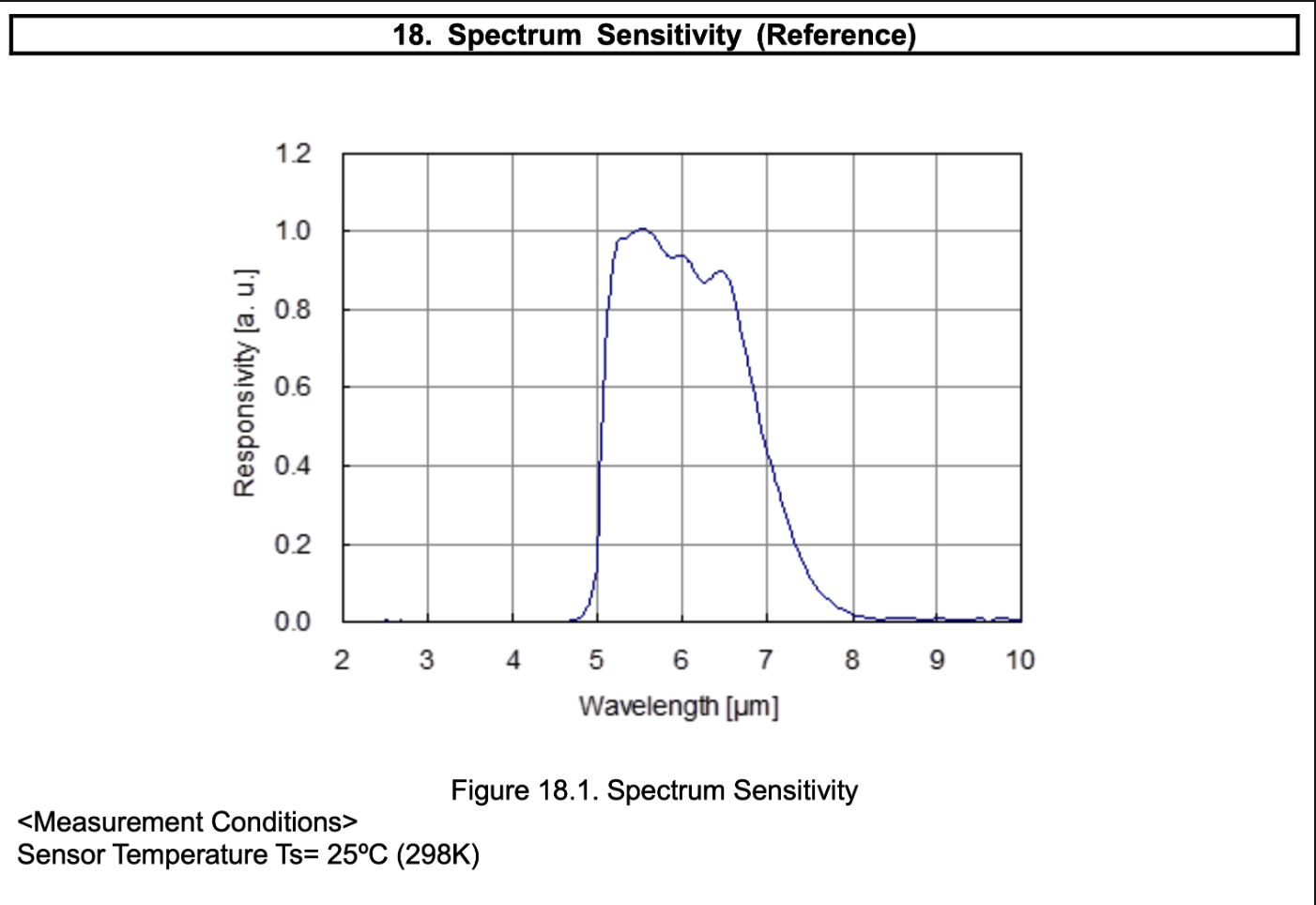
A NDIR or Nondispersive Infrared Sensor is almost the same as a PIR, but are able to capture a smaller band of infrared light WITHOUT a dispersive prism, a technique used on IR sensors without optical filters, like ours has. This does not really matter for us as sensor users.
Qwiic
We can ignore this, mostly, but it does tip us off to the fact that the sensor is communicating over I2C. Qwiic is a standard cable for I2C communication which allows breakout boards to be daisychained to a microcontroller for solder free prototyping. BORING!
4-channel
Now were getting to the fun part, this indicates that the sensor is composed of 4 separate IR sensors which all come together under one optical filter (non-dispersed, remember?) and all report together as part of the I2C messaging package. This is the super power of this chip. Instead of just getting one IR readout, we have four different channels positioned at top, bottom, left and right. As always, getting the most out of our sensor comes down to clever control code, but having four channels of information gives us a wealth of data to pull information from.
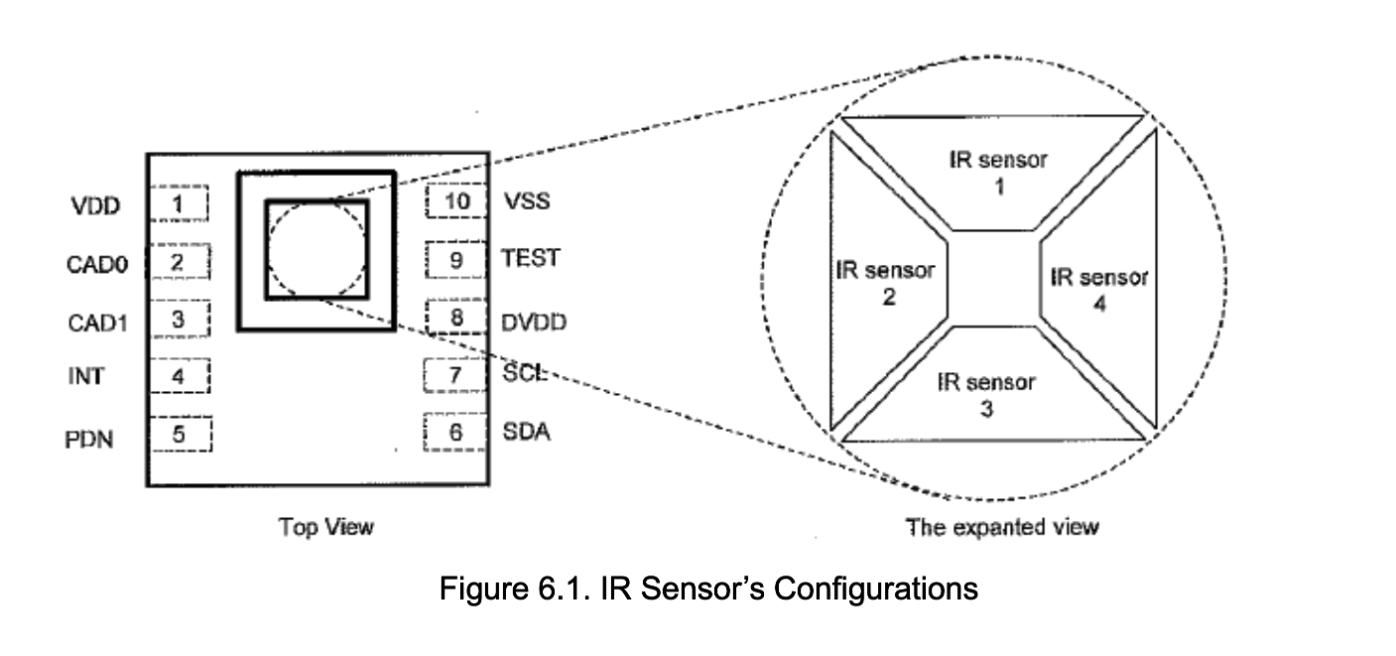
Sensing Angle
The top of the datasheet tells us the field of view for the sensor is +-80 degrees, but if we scroll down further we get the full picture
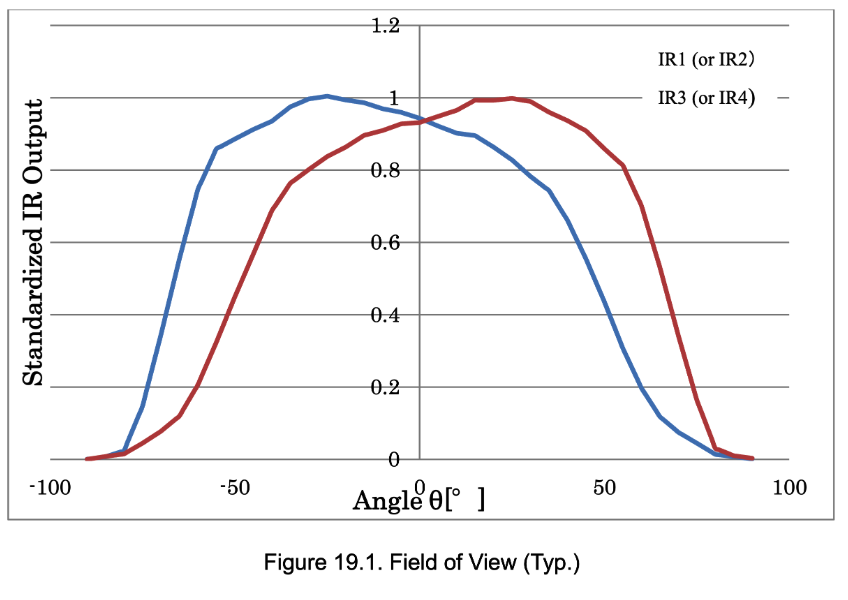
According to this diagram, we get the best perception in the middle of the sensor with the most overlap between our IR channels. Even though we can detect up to +-80 degrees, +-50 degrees is where we are the happiest. This chart begs further explanation, what conditions did this testing occur under?
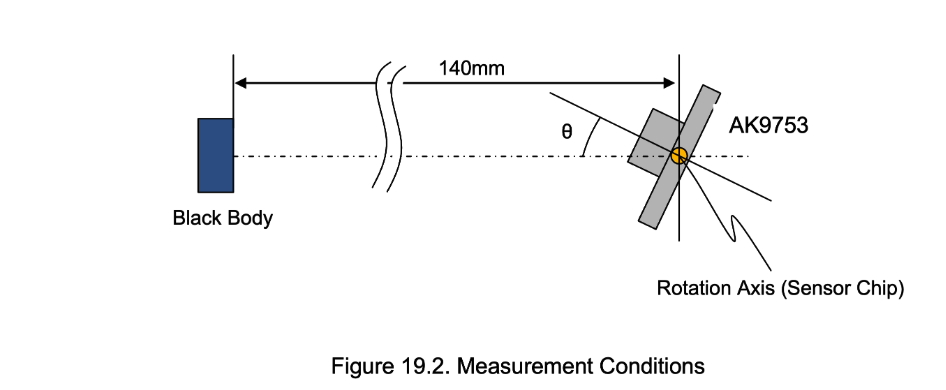
Wow, so the fov test was done at a distance of 14cm? (6in?) This is crazy short.
Given this testing situation, we can expect the fall off for its resolution to be even greater at a larger distance. I assume this range would be sufficient to detect, say, a person walking past the sensor in a hallway, and detecting their direction.
Distance
In test performed inside my apartment, I am able to pickup my presence clearly at a distance of 3ft, softly at a distance of 9 feet, and a slight change in value when I walked in the room. As is typical with light, the fall off is logarithmic, meaning we have the highest sensitivity within the first 14cm, as stated above. I believe this sensor would ideally be detecting either presence in a room, or the passage of a person in a hallway. Its ability to detect a person at 9 feet of distance would require a significant investment of time into a filtering and control algorithm.
Sensor Readout Sketch
As part of our journey to understand this sensor, we created a sensor readout P5JS Sketch which displays data from each of the individual IR sensors on the board. The sketch uses an Arduino Nano 33IOT to communicate with the webpage via serial. We had trouble with the various webserial libraries that exist out there in the world. I used claude Opus to write the final sketch
P5JS Sensor Readout Code
/*
Class 2 exercise for Intangible Interaction at ITP

This is a p5.js sketch for serial communication with Arduino.
It receives comma-separated IR sensor values from the AK9753 sensor.

Uses @gohai/p5.webserial library:
https://github.com/gohai/p5.webserial
*/

// --- CONFIGURABLE SETTINGS ---
let CANVAS_WIDTH = 400;
let CANVAS_HEIGHT = 300;
let BAUD_RATE = 9600;
let DATASHEET_IMG = "irSensorDatasheet.png";
let IR_MIN = 0;                 // color mapping min
let IR_MAX = 32767;             // color mapping max (16-bit signed)
let LABEL_SIZE = 14;
let DIVIDER_COLOR = 50;
let OUTLINE_WEIGHT = 2;
let BG_COLOR = 220;
// -----------------------------

let serial;
let portButton;
let calibrateButton;
let fromSerial;
let fromSerial_prev;
let datasheetImg;
let baseline = [0, 0, 0, 0];

function preload() {
  datasheetImg = loadImage(DATASHEET_IMG);
}

function setup() {
  createCanvas(CANVAS_WIDTH, CANVAS_HEIGHT);

  // check to see if serial is available:
  if (!navigator.serial) {
    alert("WebSerial is not supported in this browser. Try Chrome or MS Edge.");
    return;
  }

  serial = createSerial();
  makePortButton();
}

// make a port select button:
function makePortButton() {
  portButton = createButton('Choose Port');
  portButton.position(10, 10);
  portButton.mousePressed(choosePort);
}

// prompt user to select a port and open at 9600 baud:
function choosePort() {
  serial.open(BAUD_RATE);
}

// snapshot current IR values as the baseline:
function calibrate() {
  if (fromSerial) {
    let parts = fromSerial.split(",");
    if (parts.length === 4) {
      for (let i = 0; i < 4; i++) {
        baseline[i] = parseInt(parts[i]);
      }
      console.log("Baseline set:", baseline);
    }
  }
}

function draw() {
  background(BG_COLOR);

  let cx = width / 2;
  let cy = height / 2;

  // poll for serial data each frame
  if (serial && serial.opened()) {
    if (portButton) portButton.hide();
    if (!calibrateButton) {
      calibrateButton = createButton('Calibrate');
      calibrateButton.position(10, 10);
      calibrateButton.mousePressed(calibrate);
    }

    let serialLine = serial.readUntil("\n");
    if (serialLine && serialLine.length > 0) {
      fromSerial = serialLine.trim();
    }

    // parse the 4 IR values from CSV, subtract baseline
    let ir = [0, 0, 0, 0];
    if (fromSerial) {
      let parts = fromSerial.split(",");
      if (parts.length === 4) {
        for (let i = 0; i < 4; i++) {
          ir[i] = parseInt(parts[i]) - baseline[i];
        }
      }
    }

    stroke(DIVIDER_COLOR);
    strokeWeight(OUTLINE_WEIGHT);

    // top triangle (ir1): top edge -> center
    fill(irToColor(ir[0]));
    triangle(0, 0, width, 0, cx, cy);

    // left triangle (ir2): left edge -> center
    fill(irToColor(ir[1]));
    triangle(0, height, 0, 0, cx, cy);

    // bottom triangle (ir3): bottom edge -> center
    fill(irToColor(ir[2]));
    triangle(width, height, 0, height, cx, cy);

    // right triangle (ir4): right edge -> center
    fill(irToColor(ir[3]));
    triangle(width, 0, width, height, cx, cy);

    // dividing lines
    stroke(DIVIDER_COLOR);
    strokeWeight(1);
    line(0, 0, cx, cy);
    line(width, 0, cx, cy);
    line(width, height, cx, cy);
    line(0, height, cx, cy);

    // label each zone
    noStroke();
    fill(0);
    textAlign(CENTER, CENTER);
    textSize(LABEL_SIZE);
    text("IR1: " + ir[0], cx, cy / 2);
    text("IR2: " + ir[1], cx / 2, cy);
    text("IR3: " + ir[2], cx, cy + (height - cy) / 2);
    text("IR4: " + ir[3], cx + (width - cx) / 2, cy);

    fromSerial_prev = fromSerial;
  } else {
    // before connection: show datasheet image
    imageMode(CENTER);
    image(datasheetImg, cx, cy, width, height);
  }
}

// map an IR value to red with opacity (clear -> deep red)
// 16-bit signed range: -32768 to 32767
function irToColor(val) {
  let alpha = map(val, IR_MIN, IR_MAX, 0, 255, true);
  return color(255, 0, 0, alpha);
}
Arduino Nano 33IOT Code
#include <Wire.h>
#include "SparkFun_AK975X_Arduino_Library.h"
#include <Arduino.h>

AK975X movementSensor;

int ir1, ir2, ir3, ir4;

void setup(){
  Serial.begin(9600);

  Wire.begin();

  if (movementSensor.begin() == false)
  {
    Serial.println("Device not found. Check wiring.");
    while (1);
  }
}

void loop() {
  if (movementSensor.available())
  {
    ir1 = movementSensor.getIR1();
    ir2 = movementSensor.getIR2();
    ir3 = movementSensor.getIR3();
    ir4 = movementSensor.getIR4();

    Serial.print(ir1);
    Serial.print(",");
    Serial.print(ir2);
    Serial.print(",");
    Serial.print(ir3);
    Serial.print(",");
    Serial.print(ir4);
    Serial.println();

    movementSensor.refresh();
  }

  delay(100); // Adjust for responsiveness
}