Understanding Networks — Professor Tom Igoe
A VPS of my Very Own and its Firewall
A VPS lets you host a machine on someone else's computer. I am using AWS, running a t2.nano instance. When I set it up, I decide its IP range for acceptable incoming connections. If I just choose my own IP range, — will my IP ever change? So then if I always want to access it, can't I just give it an SSH key? What is the advantage of closing off the IP range when my key should be secure?
When I start it up, I run sudo apt update then sudo apt upgrade — the first gets all the latest package lists, the second installs them.
Then I install the firewall:
sudo apt install ufwufw is already the newest version (0.36.2-9build1).
ufw set to manually installed.
The following package was automatically installed and is no longer required:
pollinate
Use 'sudo apt autoremove' to remove it.
Summary:
Upgrading: 0, Installing: 0, Removing: 0, Not Upgrading: 2Apparently ufw is already installed. Next I set the defaults — block all incoming, allow all outgoing, then punch holes for what I need:
ubuntu@ip-172-31-41-114:~$ sudo ufw default allow outgoing
Default outgoing policy changed to 'allow'
(be sure to update your rules accordingly)

ubuntu@ip-172-31-41-114:~$ sudo ufw default deny incoming
Default incoming policy changed to 'deny'
(be sure to update your rules accordingly)

ubuntu@ip-172-31-41-114:~$ sudo ufw allow ssh
Rules updated
Rules updated (v6)

ubuntu@ip-172-31-41-114:~$ sudo ufw allow http/tcp
Rules updated
Rules updated (v6)

ubuntu@ip-172-31-41-114:~$ sudo ufw allow https/tcp
Rules updated
Rules updated (v6)

ubuntu@ip-172-31-41-114:~$ sudo ufw allow 8080/tcp
Rules updated
Rules updated (v6)

ubuntu@ip-172-31-41-114:~$ sudo ufw allow 8081/tcp
Rules updated
Rules updated (v6)

ubuntu@ip-172-31-41-114:~$ sudo ufw enable
Firewall is active and enabled on system startup
I allowed a few extra ports for Node.js alongside the standard http/https. Claude says I should make my ufw more restrictive for the dev ports. One thing I learned in this process is that AWS comes preconfigured with firewalls called security groups — mine are generically different than the ones installed with ufw.
Tom's Questions
How many different attempts were there to connect to your server?
I only set it up last night so there have been two attempts. I also have some double blocking because I am using AWS which has security groups, so I am not sure how that is affecting things. Those settings look like this:
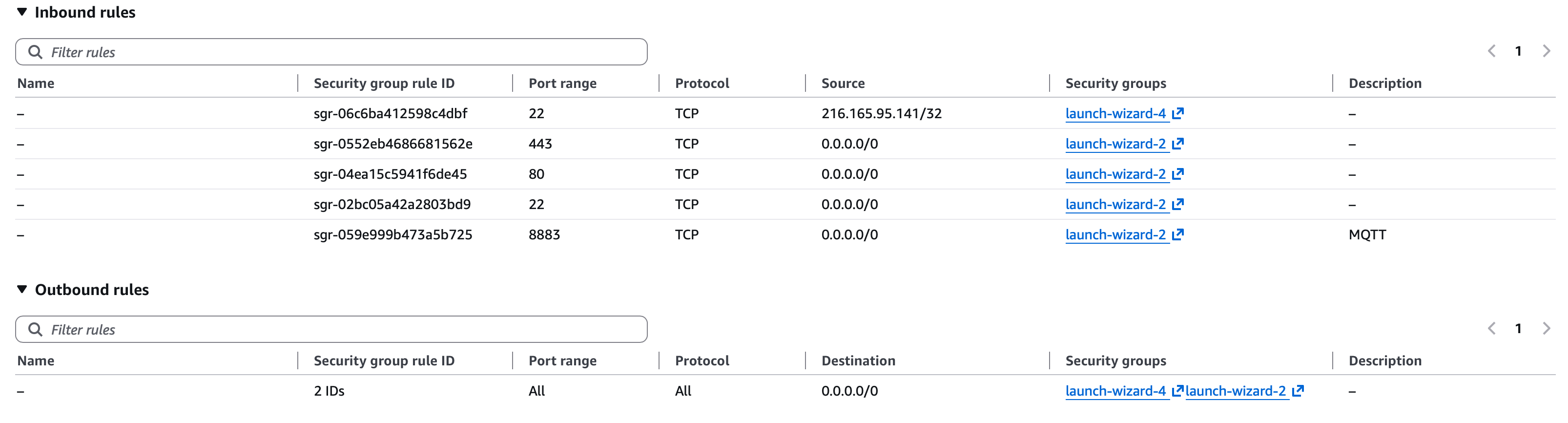
How many different IP addresses attempted to connect to your server?
One IP tried to connect twice and was blocked.
How many times did each IP address attempt to connect?
The single IP that tried, tried twice.
Where are they located?
Apparently it's a Bogon IP address, so it's outside the allocated IP range. I think it was internal to AWS servers, some kind of internal probe.
What organizations are they associated with?
The only association I can find is AWS, maybe it has been spoofed.
What service providers are providing their IP addresses?
In this case, it would be AWS.
Are there specific times of day that are most common for activity?
I got one attempt at 5:40 am and another at 9:41.
Are there IP addresses which return at regular times?
I have no trends so far.
Terminal Commands
pwd- print working directory
ls- list files
ifconfig- who's connected
sudo ufw status- what's the status of my uncomplicated firewall
sudo ls /var/log- pulls up the various logs programs are writing to
sudo head -1 /var/log/ufw.log- pulls the first line of the file
sudo tail -1 /var/log/ufw.log- pulls the last line of the file
wc -l /var/log/ufw.log- pulls the number of lines with -l
grep- highlights words
sudo cat /var/log/ufw.log | grep '172-31-41-114'- highlights all the connection attempts from this IP
sudo cat /var/log/ufw.log | grep '172-31-41-114' | wc -l- and then does a word count
sudo tail -2 /var/log/ufw.log | sed -e 's/\s/\t/g'- replace spaces with tabs
sed- Stream editor
Typical Ports
There are 65,000 ports in the OS typically — all just ways another user can connect to your server. We set a firewall to block anything we're not using. A server is just a program that watches for connections. SSH is just a program that watches for connections.
| To | Action | From | Service |
|---|---|---|---|
22/tcp | ALLOW | Anywhere | SSH |
80/tcp | ALLOW | Anywhere | Web Server |
443/tcp | ALLOW | Anywhere | Web Server (HTTPS) |
8080/tcp | ALLOW | Anywhere | |
8081/tcp | ALLOW | Anywhere | |
22/tcp (v6) | ALLOW | Anywhere (v6) | SSH |
80/tcp (v6) | ALLOW | Anywhere (v6) | Web Server |
443/tcp (v6) | ALLOW | Anywhere (v6) | Web Server (HTTPS) |
8080/tcp (v6) | ALLOW | Anywhere (v6) | |
8081/tcp (v6) | ALLOW | Anywhere (v6) |
Raw Logs
2026-09-15T05:49:48.016313+00:00 ip-172-31-41-114 kernel: [UFW BLOCK] IN=enX0 OUT= MAC=0a:ff:cf:9a:02:77:0a:10:39:23:1b:a9:08:00 SRC=193.163.125.92 DST=172.31.41.114 LEN=44 TOS=0x08 PREC=0x20 TTL=246 ID=51990 PROTO=TCP SPT=38254 DPT=8883 WINDOW=14600 RES=0x00 SYN URGP=0
2026-09-15T09:41:02.359993+00:00 ip-172-31-41-114 kernel: [UFW BLOCK] IN=enX0 OUT= MAC=0a:ff:cf:9a:02:77:0a:10:39:23:1b:a9:08:00 SRC=89.37.172.142 DST=172.31.41.114 LEN=40 TOS=0x00 PREC=0x20 TTL=55 ID=0 PROTO=TCP SPT=25041 DPT=8883 WINDOW=65535 RES=0x00 SYN URGP=0