Understanding Networks — Professor Tom Igoe
Web Server Assignment
NGINX
Its the big nov 2 2026 and Im going to install a nginx and do some stuff on the command line By Hand This is an artisanal server.
I will be engaging in the time honored learning method of reading a tutorial and relaying terminal commands, I really hate this process because I find it so hard to ask additional questions and clarifications. I will be using claude in /set-output learning mode to ask additional questions not covered by the guide, while typing in and copy pasting things by hand.
I just got into my ec2 instance, i remembered how, I navigated to my folder in dev where my key is stored and boom, copied the command from aws and logged in. Nice. I love ssh.
Now I am following this tutorial
https://www.digitalocean.com/community/tutorials/how-to-install-nginx-on-ubuntu-20-04
the server was telling me things like, you have 30 packages that could be upgraded. I asked claude how to upgrade them, it said
sudo apt upgradeI applied that, said yes.
I am always confused by my upgrade vs update, I guess I run update first and then upgrade second? It seems like it always has a few more it discovers too.
It turns out, the two which would not upgrade are packages which will upgrade automatically later
Not upgrading yet due to phasing:

  python3-software-properties  software-properties-common
at the same time, during this process, there were two more new packages
I ran
sudo apt nginxand it was already installed, nice
Im getting confused again about the ports so I will list them out
| To | Action | From | Type |
|---|---|---|---|
| 22/tcp | ALLOW | Anywhere | SSH, how I connect to the server |
| 80/tcp | ALLOW | Anywhere | HTTP, how we connect unsecured |
| 443/tcp | ALLOW | Anywhere | HTTPS, how we connect secured, its HTTP with an extra protocol |
| 8080/tcp | ALLOW | Anywhere | this is where its confusing, 8080, is an extra port for other services running, maybe they loop back and are referenced? |
| 8081/tcp | ALLOW | Anywhere | another bonus port, I dont really get it |
| Nginx HTTP | ALLOW | Anywhere | so then this is a repeat, I am deleting it |
| 22/tcp (v6) | ALLOW | Anywhere (v6) | see above, barely different, just IPv6 |
| 80/tcp (v6) | ALLOW | Anywhere (v6) | `` |
| 443/tcp (v6) | ALLOW | Anywhere (v6) | `` |
| 8080/tcp (v6) | ALLOW | Anywhere (v6) | `` |
| 8081/tcp (v6) | ALLOW | Anywhere (v6) | `` |
| Nginx HTTP (v6) | ALLOW | Anywhere (v6) | `` |
**ubuntu@ip-172-31-41-114**:**~**$ sudo ufw delete allow 'Nginx HTTP'

Rule deleted

Rule deleted (v6)

**ubuntu@ip-172-31-41-114**:**~**$
cool
so then
systemctl status nginxreports back and says I am running, which is great
I go to my IP, 18.219.105.90, and boom
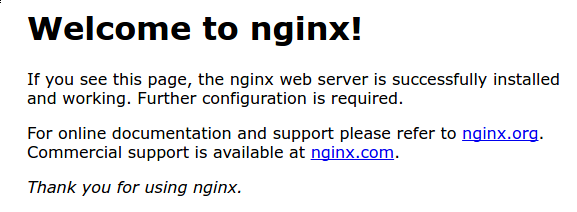
I got this, which is ideal. this information was delivered to me over port 80 because its not secure

so if I use http://localhost, it delivers me the content on port 80 at my local host. If i were to run another program, I could use localhost:8080
Now I am going to put a domain name in here. I did this before but, idk, I dont remember.
I want to assign this server to undnet.ccfrost.com, so I am going to run a bunch of stuff, here I am mostly copying and pasting. I ran into some trouble because its a lot of finicky details, claude helped a lot to clear this out.
Essentially, I used serverblocks to create another place to store my html for my webpage and then using symlinks to tie it together correctly
The next big thing on my aws is associating an elastic IP address with my server so that it can stop and start without fucking up by reassigning my ip. I had a really embarrassing meeting with a client where my elastic IP was not yet set, and so when I turned her server back on, it changed everything and I was stuck with the default nginx page. I was able to correct it quickly, but that meeting was toast.
So first elastic IP, then I associated it with my dns
eventually
codyfrost@10-23-10-6 UndNet % curl  http://undnet.ccfrost.com

<html>

    <head>

        <title>Welcome to undnet.ccfrost.com!</title>

    </head>

    <body>

        <h1>Success! The undnet.ccfrost.com  server block is working!</h1>

    </body>

</html>
I really love claude, in learning mode, it gave me this insight.

So then, its all set up
ubuntu@ip-172-31-41-114:/var$ cd www/
ubuntu@ip-172-31-41-114:/var/www$ ls
html  undnet.ccfrost.com
ubuntu@ip-172-31-41-114:/var/www$ cd undnet.ccfrost.com/
ubuntu@ip-172-31-41-114:/var/www/undnet.ccfrost.com$ ls
html
All I have is a simple html file. I can get it with curl, but my web browser rejects me, so I will now be setting up
HTTPS
Following this tutorial
https://www.digitalocean.com/community/tutorials/how-to-secure-nginx-with-let-s-encrypt-on-ubuntu-20-04
sudo apt install certbot python3-certbot-nginxSo certbot will handle my certification and renew it every 60 days, automatically, nice
"- Certbot’s Nginx plugin automatically modifies server blocks to enable HTTPS, configure redirects, and implement SSL directives without manual editing."
-digital ocean
my firewall was already configured from earlier, so I just ran
sudo certbot --nginx -d undnet.ccfrost.comand I was successful!

The tutorial mentions moving all the http traffic to https, but I didnt see that exposed, so I tried this out
curl -I http://undnet.ccfrost.comand I got 301, permanently moved, life is good. Now Ill make my website.
ubuntu@ip-172-31-41-114:~$ cd ..
ubuntu@ip-172-31-41-114:/home$ ls
ubuntu
ubuntu@ip-172-31-41-114:/home$ cd ..
ubuntu@ip-172-31-41-114:/$ ls
bin   dev  home  lib64       media  opt   root  sbin  srv  tmp  var
boot  etc  lib   lost+found  mnt    proc  run   snap  sys  usr
ubuntu@ip-172-31-41-114:/$ cd var
ubuntu@ip-172-31-41-114:/var$ ls
backups  crash  local  log   opt  snap   tmp
cache    lib    lock   mail  run  spool  www
ubuntu@ip-172-31-41-114:/var$ cd www
ubuntu@ip-172-31-41-114:/var/www$ ls
html  undnet.ccfrost.com
ubuntu@ip-172-31-41-114:/var/www$ cd undnet.ccfrost.com/
ubuntu@ip-172-31-41-114:/var/www/undnet.ccfrost.com$ ls
html
ubuntu@ip-172-31-41-114:/var/www/undnet.ccfrost.com$
Holy shit, I am getting better at this, I straight up cooked through this straight to where my page is hosted. Never before have I been this capable! Its funny how you learn all this bit by bit, like what is lib, idk, maybe someday it will be relevant.
<html>

    <head>

        <title>Welcome to undnet.ccfrost.com!</title>

    </head>

    <body>

        <h1>This is the home of hand written and copy pasted undnet hom

        ework stuff.</h1>

        <h2> I really cant believe people worked like this </h2>

        <h3> its really slow and annoying to have to type it all out

                 </h3>

        <h4> and worry about my line breaks and stuff</h4>

        <h5> but I guess it is kinda fun </h5>

    </body>

</html>